Planning a cleaning company's shifts with AI and Excel: when you need scheduling software
A realistic test: 40 clients, 20 cleaners, one month
A monthly shift plan for dozens of clients and people can be built in a very short time with an AI assistant and an Excel file, but it holds only as long as nothing changes. We tested it on a deliberately demanding case, a cleaning company near Milan, to see where the method works and where scheduling software starts to pay off.
An AI assistant and an Excel file produced a full monthly shift plan in a very short time, and the most useful moment was when the AI refused to force an impossible plan. The plan works while nothing changes: with no spare staff, one holiday leaves a pair of clients uncovered, and the Excel file and the calendar have to be kept aligned by hand. When schedules change every week, a shared planning tool with one data source and automatic alerts is the better fit.
The test case
A cleaning company near Milan. All names and addresses are invented.
40clients: 20 offices and 20 shops, in 10 zones
20cleaners: 2 per zone, alternating mornings and evenings week by week
1,290person-hours to plan in November 2026, with no spare staff
Clients are half offices and half shops, between Milan and the surrounding towns (Sesto San Giovanni, Rho, San Donato, Segrate, Cinisello). Offices are cleaned from 7:00 to 9:00 and need 1 hour; shops from 20:00 to 23:00 and need 1 hour 30 minutes.
Service is daily on weekdays. On Saturdays only the shops are cleaned, with 2 people each. Cleaners live in the zone they serve. November 2026 has 21 weekdays and 4 Saturdays.
The first answer was no
The rule we gave the AI at the start: if you cannot plan because of a lack of staff, stop and ask.
50 clients with 20 people: not feasible
With windows this narrow, one person can serve at most two clients in the same window, and only if they are close. Someone who finishes at 23:00 cannot start at 7:00 the next day without breaking the 11-hour rest rule. Two separate teams are needed, one for mornings and one for evenings: 26 people in the best case, 50 in a realistic one.
The AI stopped and asked
The rule triggered right away, before any file was built. The AI showed the numbers and offered three ways out: more staff (from 26 to 50 people), fewer clients, or wider time windows.
We chose the ideal case
40 clients with 20 people, in 10 zones. Each zone has 2 nearby offices, 2 nearby shops and 2 cleaners who alternate between mornings and evenings every week. There are no reserves.
The method: one step at a time
Not a single order, but a conversation: each request added a layer to the plan and checked the result.
1
Describe constraints and expected result
Time windows, people per client, categories and addresses, plus the file layout: people on the left, days across the top, colours by category.
2
Give a stop rule
“If you cannot plan because of a lack of staff, stop and ask me.” It is what turned an impossible request into a decision for a person.
3
Check feasibility before building
The AI counted the people needed for each window and found that 50 clients did not fit 20 cleaners. It then declared its assumptions: no mid-week public holidays, nearby clients in pairs, weekly rotation between mornings and evenings.
4
Add one layer at a time
First the plan, then costs, hours per person, pivot tables, a printout per employee and the calendar.
5
Check the numbers
The cost sheet has a balancing cell that must stay at zero, and every change was re-read before moving on.
6
Test on a small scale
Shifts were created on the calendar of a single test person, not of the whole team.
What we got
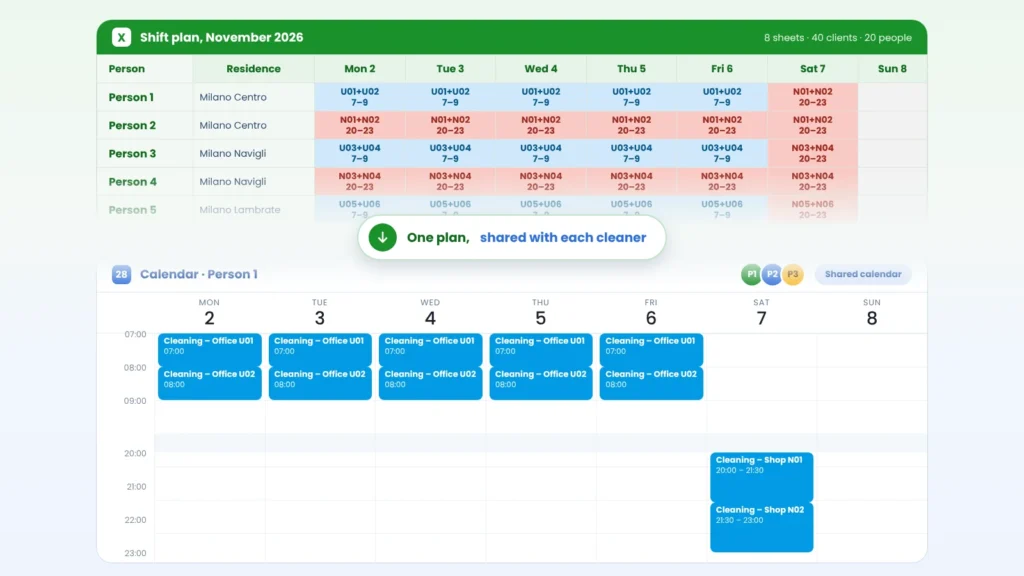
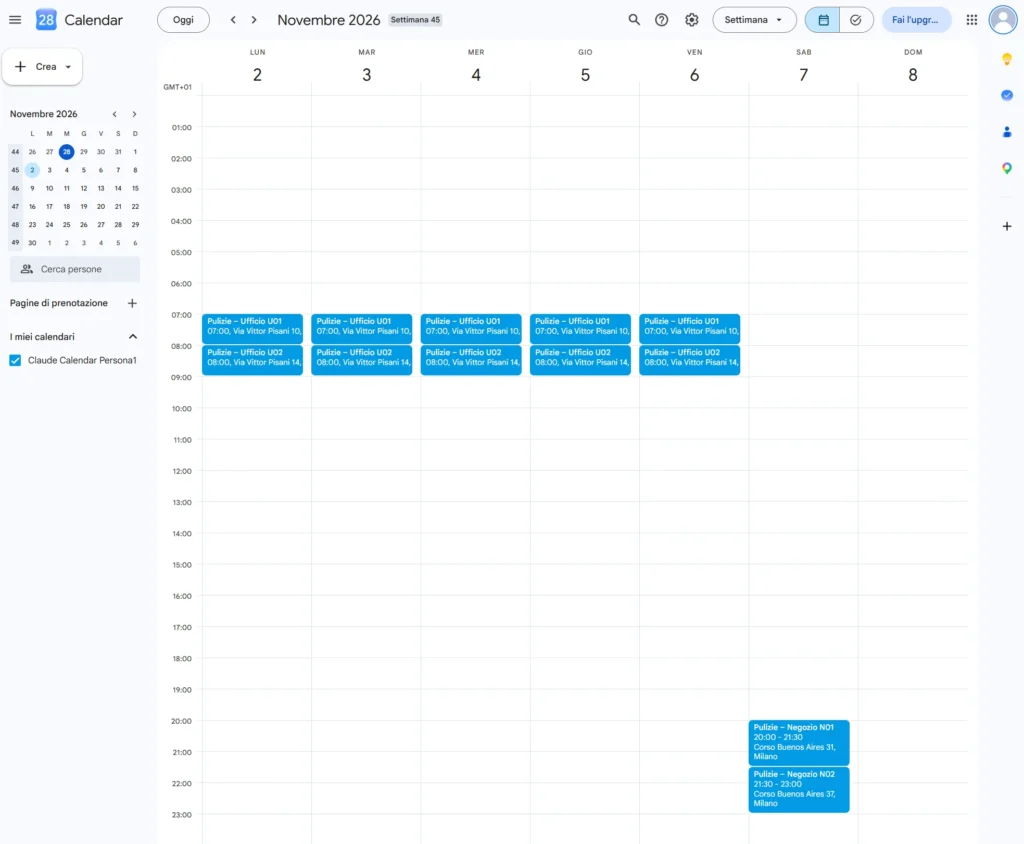
In a few steps the plan became an Excel file of 8 sheets and 50 shifts on the Google Calendar of one test person, all consistent with each other. Travel is minimal: each cleaner works in one zone and, when they do two clients in a row, the buildings are close.
Sheet
What it is for
November plan
People on the left, days across the top, light blue for offices and red for shops
Printout per employee
20 landscape A4 pages, one per person, with day, time and address
Hours per person
A filterable table of all shifts, with place and category
Pivots by person and by client
Hours, shifts and costs crossed by person and by client
Costs per client
Hourly cost per person, cost per client and a balancing check
Clients and people
Zones, addresses and pairs of cleaners
Notes and assumptions
The assumptions declared by the plan
The calendar of one test cleaner for the week of 2–8 November 2026: two offices every weekday morning, 7:00 and 8:00, and two shops on Saturday evening. Names and addresses are invented.
1,290person-hours: 420 in offices and 630 in shops on weekdays, plus 240 on Saturdays
64–65hours per cleaner in the month, with at least 21 hours of rest between working days
€19,350labour cost at a sample rate of €15 per hour: €6,300 offices, €13,050 shops
The cost balancing check is at zero and the file contains no formula errors. The pivot sheets are formula-based tables, not native Excel PivotTables: they update with the data but cannot be rearranged by dragging fields. The hourly rate is an example for the test, not a market figure.
Free download
Download the example plan
Excel .xlsx · in Italian · 8 sheets · 133 KB
The same file described above: the November plan, the printout for each employee, hours, pivots and costs, with invented clients and addresses. Replace the data with yours and change the assumptions in the last sheet.
The unexpected events showed where the value of the method ends and the cost of managing it begins.
A holiday with no cover
In the first test a cleaner asked for leave from 5 to 12 November: six shifts uncovered and nobody to replace them. Even with 40 clients there is no spare staff, so an absence leaves one zone's pair of clients uncovered. The AI suggests external replacements, time-window changes or skipped services, but the owner decides.
Shifts one hour off
The shifts in the calendar appeared one hour off because Google had read them as UTC. The events were corrected, but the display was in UTC too: a settings problem, not a data problem.
A change of time window
Moving one cleaner's Thursday shift from 7:00 to 19:00 meant updating both the file and the calendar events: two tools to keep aligned by hand. Rest between Thursday evening and Friday morning stays at 11 hours, the minimum required; checking it against the contract is a job for the labour consultant.
AI with Excel and a calendar, or PlanningPME?
PlanningPME gives the biggest advantage in day-to-day management. The AI method wins on fast set-up and “what if” reasoning.
Criterion
AI with Excel and Google Calendar
PlanningPME
Data
Separate file and calendar, aligned by hand
One shared plan, viewed and updated online
Holidays and absences
Handled by hand; cover is checked by asking the AI
An absence module changes the schedule and notifies the people concerned
Conflicts and availability
A check to request at every change
The schedule highlights unavailability and overlaps
Communication with employees
Calendar events created one by one
A schedule the teams can consult, with notifications and reminders
Actual hours (consuntivazione)
Not possible: a shared calendar shows the plan, not the work actually done. Hours have to be collected and typed into the file separately
Possible with the PlanningConnect mobile app linked to PlanningPME: operators record the work done on site and it returns to the office, to feed timesheets and the next plan
Working-time rules
Checked by asking, to be verified against the contract
Constraints configurable according to collective agreements and the law in force
Reports
Formulas and pivots to maintain in the file
Statistics on hours worked, exportable to Excel
Start
A few minutes, with tools you already have
Needs resources and rules to be set up first
“What if” scenarios
Immediate: you ask and it recalculates
Depend on how it is configured
Working-time rules differ by country and contract: check the details for your case with a consultant. PlanningPME also integrates with Google Calendar and exports data to Excel, so you do not have to choose one or the other.
Closing the circle: from the plan to the field and back
The test ends when the shifts reach the calendar. In a real company, the work starts there.
In our test the plan said 1,290 person-hours, but nobody could say how many hours were actually worked, or how the work went on site. That information lives outside the file. With PlanningConnect the circle closes: the tasks planned in PlanningPME reach each operator's mobile app, and the actual work recorded on site returns to the office in real time.
Once the actual hours are recorded, an AI tool can compare them with the plan in minutes, provided the data is precise. You can see what that looks like in this interactive demo of AI analysis on scheduling data.
1
Plan
Everyone works on one calendar: shifts, leave requests and staff availability at a glance.
2
Execute on site
Each operator sees their own agenda in the mobile app and records the work done, live or later.
3
Record the actuals
Actual hours come back to the office as timesheets and an Excel export, to compare with what was planned. No formulas to maintain.
4
Improve
Staff saturation and progress analysis feed the next plan, so every cycle makes the schedule more accurate.
With few clients and stable schedules the AI method is enough. When schedules change every week you need a planning tool.
1
Stable schedules, few people
AI, Excel and a shared calendar are enough and take about an hour to set up. The risk is drift between the file and the calendar.
2
Frequent absences, several editors, cover to guarantee
A dedicated software is better: one data source and automatic alerts.
3
A hybrid approach
Use the AI to define rules, constraints and first scenarios, then manage the plan in the software. PlanningPME works with Excel and Google Calendar, so the move does not start from zero.
The most useful result
It came from the stop rule again: faced with 50 clients and 20 people, the AI did not force an impossible plan. It showed the numbers and left the choice to a person. With 40 clients the plan works, but with no margin, and that is the point where software with alerts and cover starts to pay for itself.
Yes, for a well-defined problem. Give it time windows, people and rules and it can build the plan in Excel in a very short time, and flag when it is not feasible. It does not replace checking the numbers or deciding how to cover absences.
Does the plan update itself when someone is absent?
No. In the test, a holiday or a change of shift meant updating the Excel file and the calendar events by hand.
How do I record the hours actually worked, not just the planned ones?
A shared Google Calendar shows the plan only. With the PlanningConnect mobile app linked to PlanningPME, each operator records the work done on site, the data returns to the office in real time and feeds the timesheets and the next plan.
When does a cleaning company need scheduling software?
When shifts change every week, several people edit the plan or absences have to be covered quickly. At that point you need one data source and automatic alerts. See how we help cleaning companies.
Can I keep using Excel with PlanningPME?
Yes. PlanningPME exports data to Excel, also as a pivot table, and fills ready-made templates with the information already in the calendar.
Does the plan respect rest periods and working-time rules?
In the test, the plan calculated the rest between shifts, but checking it against the contract is a job for the labour consultant. In PlanningPME, constraints can be configured according to collective agreements and the law in force; check your case with a consultant.
Can I download the Excel file from the test?
Yes. The example plan is free to download, in Italian, with invented clients and addresses. See the section above and our other free Excel templates.
Starting from a spreadsheet? Use a free template
Weekly and monthly calendars, holiday plan, work shifts and a project Gantt, with weekends and public holidays shaded.