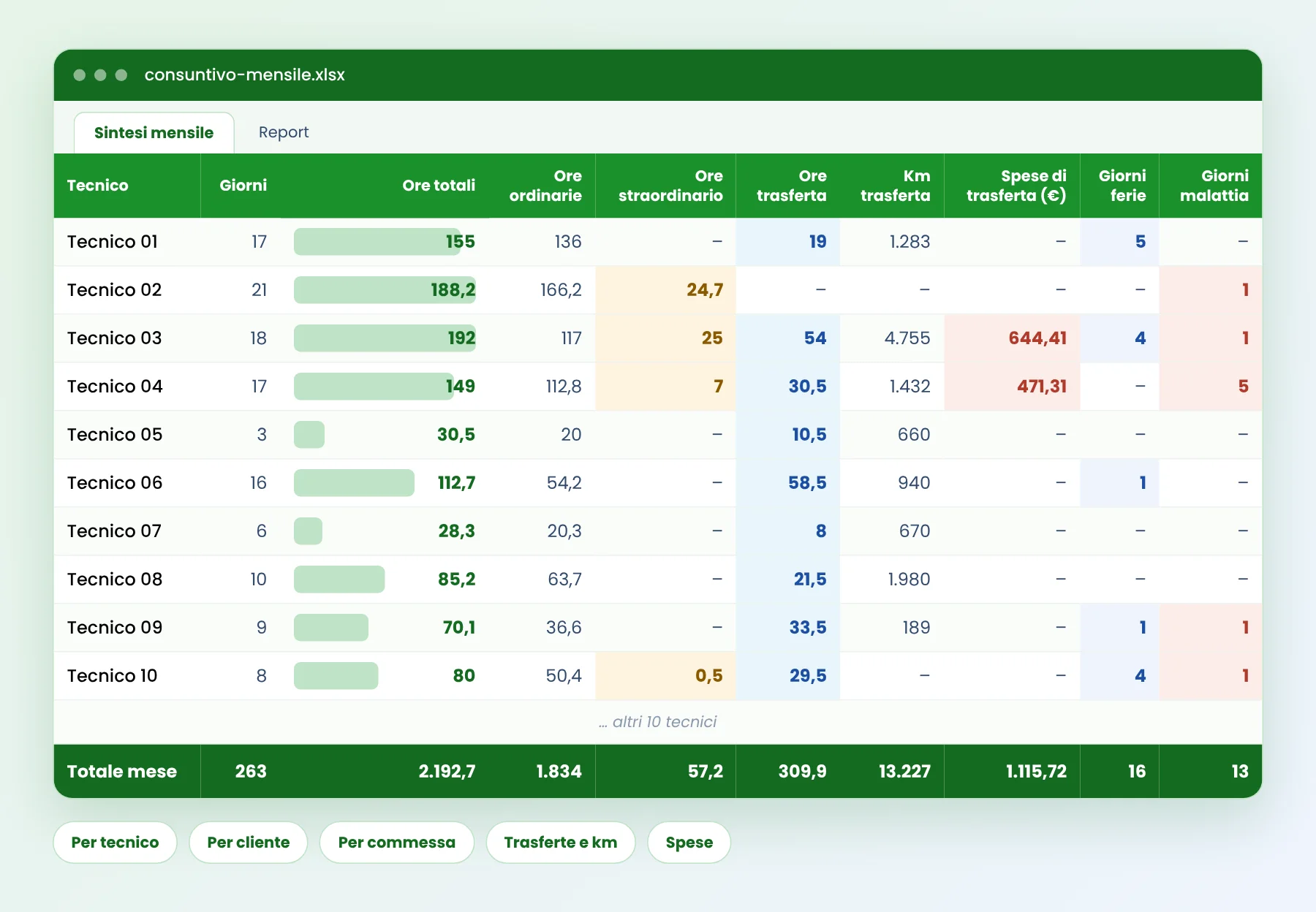
 Monthly summary
Totals for each technician, in one view
Days, hours, standard and overtime work, travel hours, kilometres, expenses, leave and sick days, with the totals of the month in the last row.

Hours, travel and expenses by technician, client and job order, every month
See what a monthly timesheet report looks like when it is produced for you. The Excel file below comes from PlanningConnect: technicians record their work with the app and the report builds itself, with no re-typing and no chasing of paper sheets.
A real month of work for 20 technicians, anonymised. Open it in Excel and filter it by technician, client or job order.
Monthly summaryDays, hours, standard and overtime work, travel hours, kilometres, expenses, leave and sick days, with the totals of the month in the last row.
Sheet 1 is the monthly summary. Sheet 2 is the detailed report, one line for each entry, with date, times, hours, travel, kilometres, expenses, activity, client and job order.
Download the report ↓When the work is done outside the office, the hours come back a few days late, on paper, in messages or in a personal spreadsheet. Someone has to collect them, type them again and check them before the month can be closed.
The cost is not only time. Without the actual hours, kilometres and expenses for each job order, you cannot tell how much a job really cost, what to invoice or which technician was on the road for how long.
The data is recorded once, where the work happens, and the report follows.
Technicians note start and end of each activity, travel, kilometres and expenses from their phone. Read about the mobile app and time clocking.
The Timesheets and travel costs module gathers hours, travel and expenses and links each one to a technician, a client and a job order.
At the end of the month the report is extracted automatically as an Excel file, ready to check, to invoice from or to send to payroll.
One file, several ways to read the same month.
Hours worked, overtime, travel time, leave and sick days for each person, with the monthly total.
Filter the detailed sheet by client or by job order to see the hours and activities spent on each one.
Travel hours split into working time and extra time, and the kilometres driven, for each trip.
Meals, hotels and other expenses with their amount, linked to the same technician and job order.
The report suits every company that sends people to work at the customer’s site and needs to know what each job cost: installation and maintenance, cleaning and facility services, event production, field service and technical assistance. If your team works in more than one place, the file saves the monthly collection of hours and expenses.
Read how the pieces fit together in job and time management, and see all the PlanningConnect modules.
How to clean a spreadsheet of shifts and prepare it for planning.
Read the guide →Weekly and monthly calendars, holiday plan, work shifts and project Gantt.
Download the templates →The module that records hours, travel and expenses and builds the monthly report.
See the module →Short answers about the file and how it is produced.