PlanningConnect · Mobile & Web

Job and Time management on mobile devices with PlanningConnect

Plan on the calendar, execute on the field, control time and costs

One connected flow: tasks planned in PlanningPME reach every operator’s mobile app, and the data collected on site returns to the office in real time.

Mobile App FullEverything in Light, plus more
Mobile App LightIncluded in Full
  • Easy weekly, monthly agenda
  • To Do List for the current day
  • Easy Leaves requests
  • Real time access to data from everywhere
+Full adds
  • Full Access to your own Calendar
  • Working time
  • Check List and Documentation
  • Trip Time & Costs

The whole job process, step by step

From the planning calendar to the field and back: every step of the operational flow is covered, and the results feed the next plan.

Analysis and time sheets feed the next planning: every cycle makes the schedule more accurate.
2-minute demo

Mobile App in 2 minutes

Take a look to how it works! In 2 minutes you can easily understand the main focus of the PlanningConnect Mobile App.

Make your daily work faster and easier, plan and check.

See the app features

PlanningConnect Mobile and Web components for on site job management

The solution at a glance: one calendar, one app for each operator, one flow of data.

One calendar for everyone
Plan

One calendar for everyone

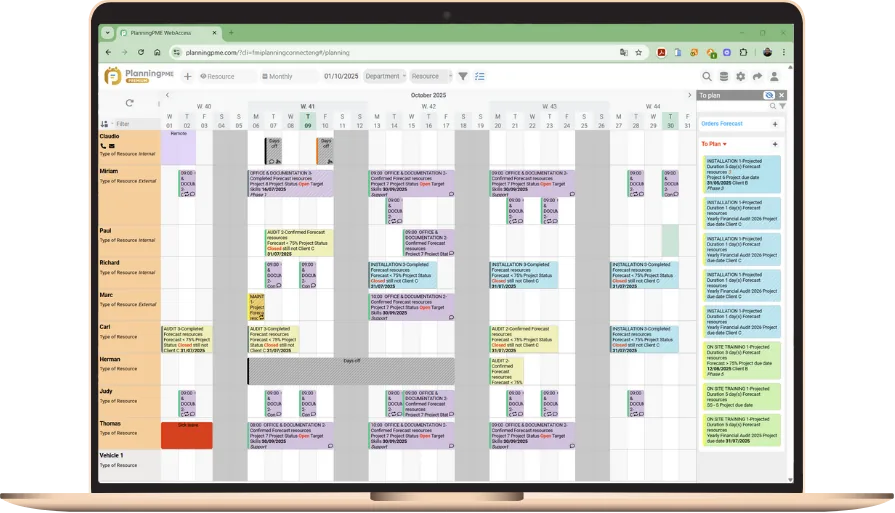
We offer a solution that provides task planning through a calendar where all resources are visible on a single screen, along with a dedicated application for each operator who will be carrying out the assigned task. Combining planning data with the execution data of individual resources provides those responsible for monitoring the progress of assigned work, project progress, cost analysis, and overall resource utilization.

A single planning calendar allows you to record attendance and absences and provides planners with a precise overview of resource availability. Additionally, it provides details regarding attendance and absences to those who will be responsible for the administrative aspects of personnel management.

The operation is very fluid and collaborative thanks to the objectives guaranteed by the Mobile App, along with the planning features of PlanningPME.
Leaves and working hours, in real time
Record

Leaves and working hours, in real time

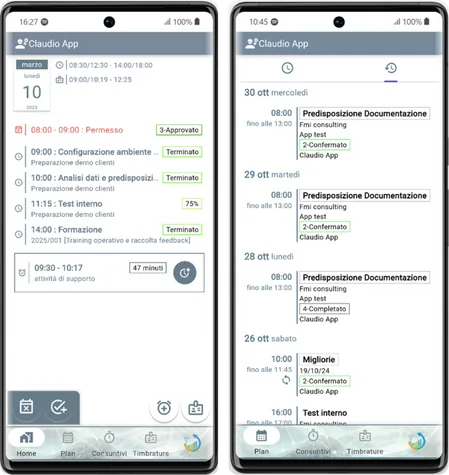
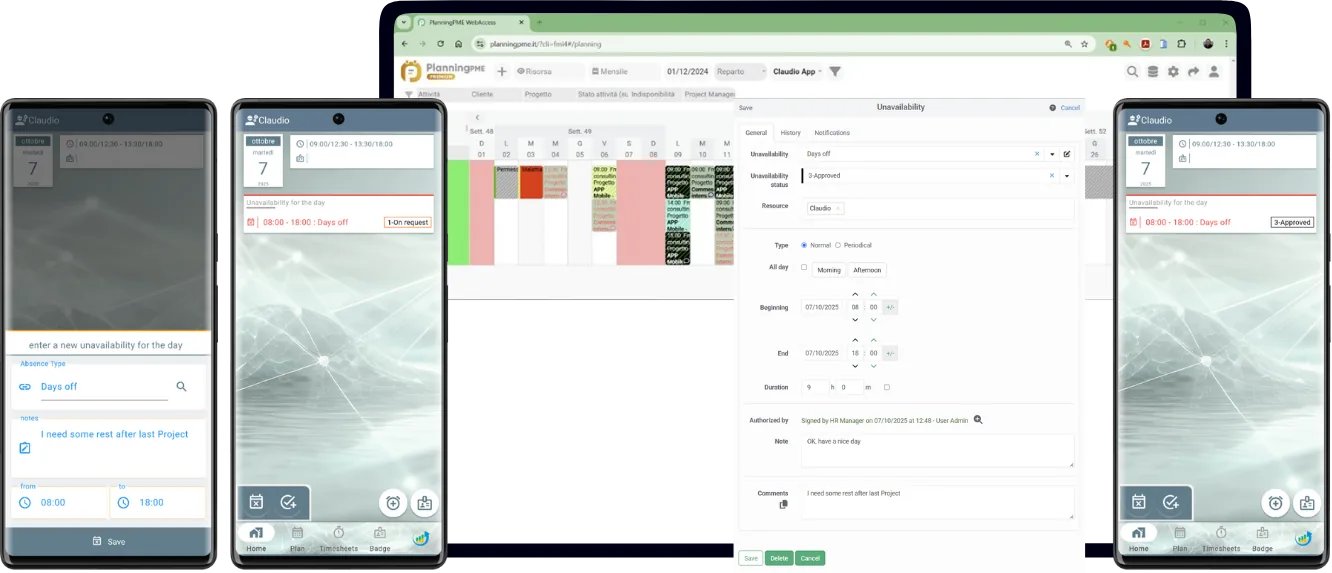
Individual operators will be able to request holidays and leave and add activities to their agenda, which will be visible to everyone in real time on the shared planning calendar.

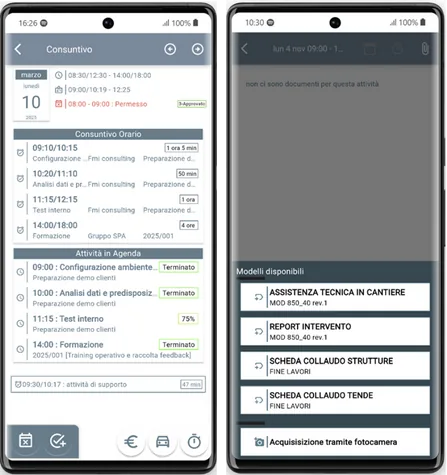
Recording working hours, whether in the office, on a specific activity, at a client’s premises, or on a construction site, facilitates integration with time and attendance management software and allows you to maintain a complete overview of your personnel’s location.

Paperless on-site documentation
Document

Paperless on-site documentation

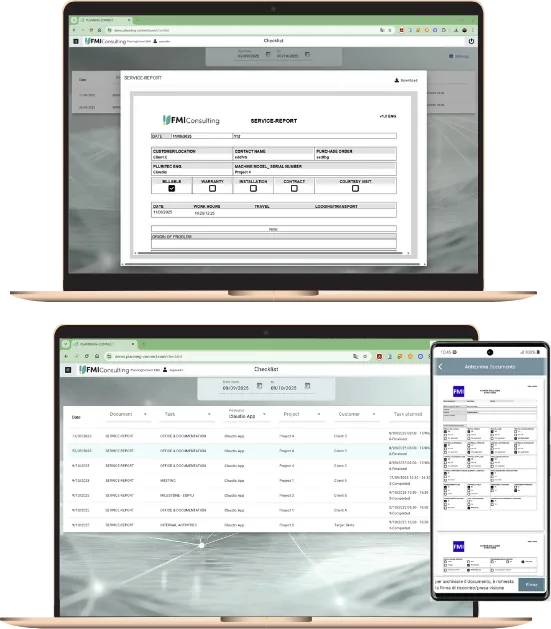
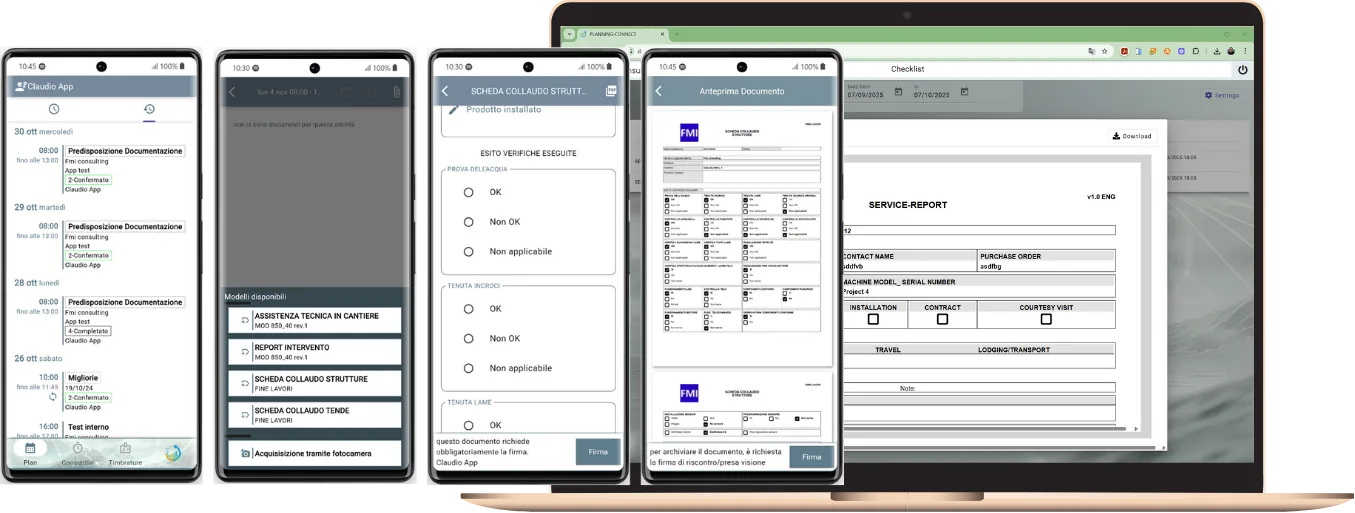
Each operator will be able to complete their intervention report and obtain their customer’s signature either live or at a later time. The documents required may vary according to the specific needs, ranging from a general site visit to a specialised checklist. The field documentation collected facilitates a paperless process and enables real-time access to the documentation by office staff through the features provided by the dedicated cloud document module. This documentation will also be directly accessible in PlanningPME, linked to the planned activity.

The tracking of intervention times and costs complements the potential of our application.

We can use the collected data to start analysis with the additional PlanningConnect modules, particularly the Staff Saturation and Client/Project Analysis modules.

01

Plan

PlanningPME monthly calendar with staff availability
Step 1 · Plan

Fully interacts with PlanningPME calendar

Planners always have an overview of the tasks’ progress and see how they can optimise the schedule for new tasks’ requirements or projects’ finalisation.

Planners can focus on strategic planning rather than wasting hours gathering daily feedback from each resource and updating the scheduling calendar.

  • All staff availability at a glance
  • Automatic notifications for authorization processes
  • Easy list of unavailabilities
  • Real time access to data 24h/7
  • Easy Leaves requests process
↑ Process overview
02

Execute on site

PlanningConnect Mobile App base: daily and monthly agenda
Step 2 · Execute

Mobile App base

Each Resource has access to his own agenda and can see Job details, Client’s address, phone number, email, and Project main data, and details of the specific task assigned. He can see also other Teams components, and he can change the Status of the Task. The process flows easily and without additional effort or missing communications.

  • Easy weekly, monthly agenda
  • To Do List for the current day
  • Easy Leaves requests
  • Real time access to data from everywhere
↑ Process overview
PlanningConnect Mobile App full: on-field documents
Step 2 · Execute

Mobile App full

Each User can create new Tasks in his own Agenda and make them visible immediately into the PlanningPME overall calendar. Each user can register his own Working Time and Travel costs, input details about his work, and close his job. He can collect the client’s signature directly on the report and store it automatically into the PlanningConnect cloud storage.

  • Full Access to your own Calendar
  • Working time
  • Check List and Documentation
  • Trip Time & Costs
  • Real time access to data from mobile
↑ Process overview
Work order documents in the PlanningConnect cloud
Step 2 · Execute

Documents in cloud

Do you need a simple way to collect, retrieve and share work order documentation? Just after the on-site signature, each document is immediately available for your office colleagues. You can obtain your client’s signature through a secure process if you fail to get it. You are free to use your cloud documents area.

  • Find documents directly connected to PlanningPME Tasks
  • Multiple Work order reports and checklists by Task
  • Fast search by Document type, Client, Project, ..
  • Easy download and share
  • Deferred Client’s signature collection
  • Sharepoint, OneDrive, GoogleDocuments, storage
↑ Process overview
03

Control

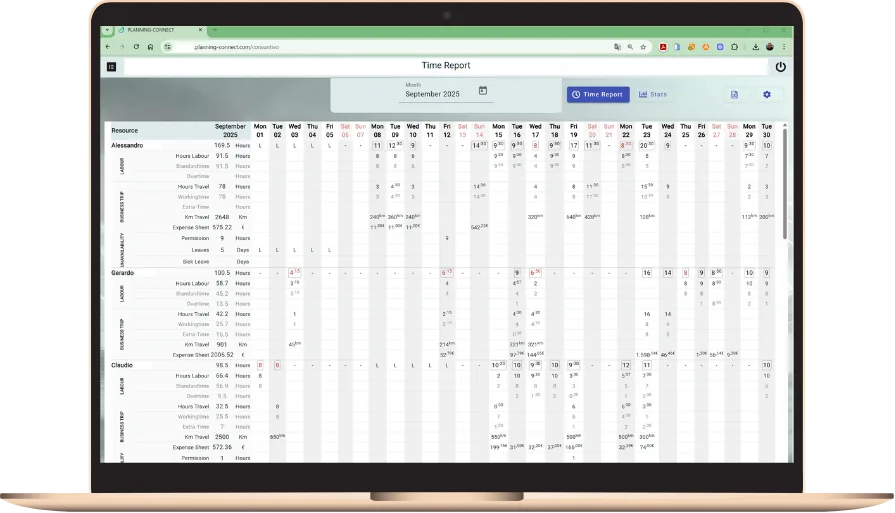
Monthly working time report
Step 3 · Control

Monthly Time sheet

Monitor in real time the progress of registering working hours and costs for each employee. Export the registration details into an Excel file format. Verify and send the information to the Projects and HR departments.

  • Working Time by employee
  • Monitor tasks status
  • Summary by Project and by Phase
  • Summary of Absence by employee
  • Export to Excel file format
Download the monthly timesheet template

You can get this file automatically from the PlanningConnect Timesheet module or you can use it for a manual edit.

↑ Process overview
04

Improve

PlanningConnect additional modules
Step 4 · Improve

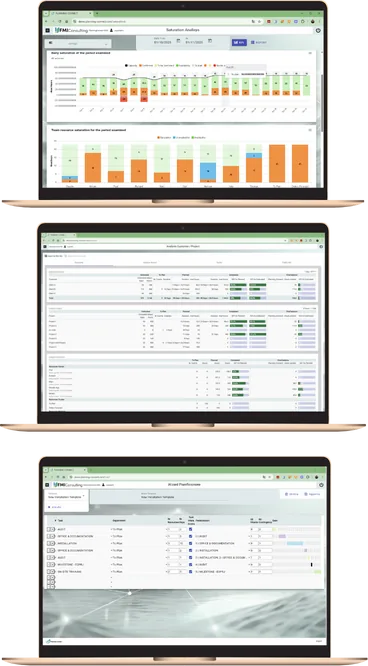
Additional Modules

You can get even more with our additional modules dedicated to automation and analysis.

You can automate with a simple procedure that sends emails and reminders to your employees, clients, project managers, commercials, and administration roles without any effort.

Each new order, still not assigned, all the scheduled tasks, all the unavailabilities, and the commercial forecasts are fully under control. The Staff saturation analysis module grants you a real future workload view and helps you to avoid critical situations.

An easy and powerful tool for defining and creating timelines for your projects, assign resources, time and define sequence of tasks using our Project wizard module.

Each task contributes to the overall progress of your projects. Using the Client/project analysis module, you can monitor all your projects in real time.

  • Staff saturation analysis
  • E-mail scheduling
  • Client/Project progress analysis
  • Project wizard
Go to complete List of Modules↑ Process overview

Ask for a free Demo!

See the whole process working on your own data.

Plans and modules for job and time tracking

Time & costs planThe plan built for timesheets and job costing, with unlimited users.See the plan →Timesheets moduleHow hours are collected, checked and reported.Read the details →Mobile clockingLet field staff record their time from the smartphone.Read the details →PlanningConnect overviewAutomation, execution and analysis in one suite.Discover PlanningConnect →Industrial assemblyJob tracking for machine builders and installers.Read more →